
CS111 Objectives
A blog about how I met the objectives for CS111.
CS111 Requirements
| Category | Objective | How the Castle Game Implements It |
|---|---|---|
| Object-Oriented Programming | Writing Classes | Custom character classes extend base engine classes for player, NPC, and enemy behavior. |
| Methods & Parameters | Methods accept parameters for collision and interaction handling. | |
| Instantiation & Objects | Levels instantiate game objects with class + data configs. | |
| Inheritance (Basic) | Multi-level inheritance chain for game objects. | |
| Method Overriding | Child classes override engine lifecycle methods. | |
| Constructor Chaining | Subclasses call super(...) to wire base state. |
|
| Control Structures | Iteration (HW) | Loops iterate over game objects and collision checks. |
| Conditionals (HW) | Gameplay checks for states, collisions, and boundaries. | |
| Nested Conditions (HW) | Multi-level checks for collision + win state. | |
| Data Types | Numbers | Positions, velocity, hit counts, and timing. |
| Strings (HW) | Sprite paths, ids, and UI text. | |
| Booleans (HW) | State flags for game logic. | |
| Arrays (HW) | Collections of objects and config lists. | |
| Objects (JSON) | Configuration objects for sprites and levels. | |
| Operators | Mathematical (HW) | Movement and speed updates use math operators. |
| String Operations (HW) | Concatenation and template literals for UI. | |
| Boolean Expressions (HW) | Compound logic for movement and collision. | |
| Input/Output | Keyboard Input | Key events drive player movement and NPC interact. |
| Canvas Rendering | Sprites and frames drawn on canvas. | |
| GameEnv Configuration | Game canvas is created and sized by GameEnv. | |
| API Integration | Leaderboard uses fetch to POST/GET scores. | |
| Asynchronous I/O | Promises handle fetch results and errors. | |
| JSON Parsing | Local storage and API payloads parsed to objects. | |
| Documentation | Code Comments | JSDoc blocks document engine classes. |
| Mini-Lesson Documentation | This notebook embeds the playable demo. | |
| Code Highlights | Snippets below show OOP, collisions, and API use. | |
| Debugging | Console Debugging | Logs track state and transitions. |
| Hit Box Visualization | Debug helper draws collision circle. | |
| Source-Level Debugging | Breakpoints can be set in engine classes. | |
| Network Debugging | Fetch calls are visible in Network tab. | |
| Application Debugging | Local storage tracks game settings. | |
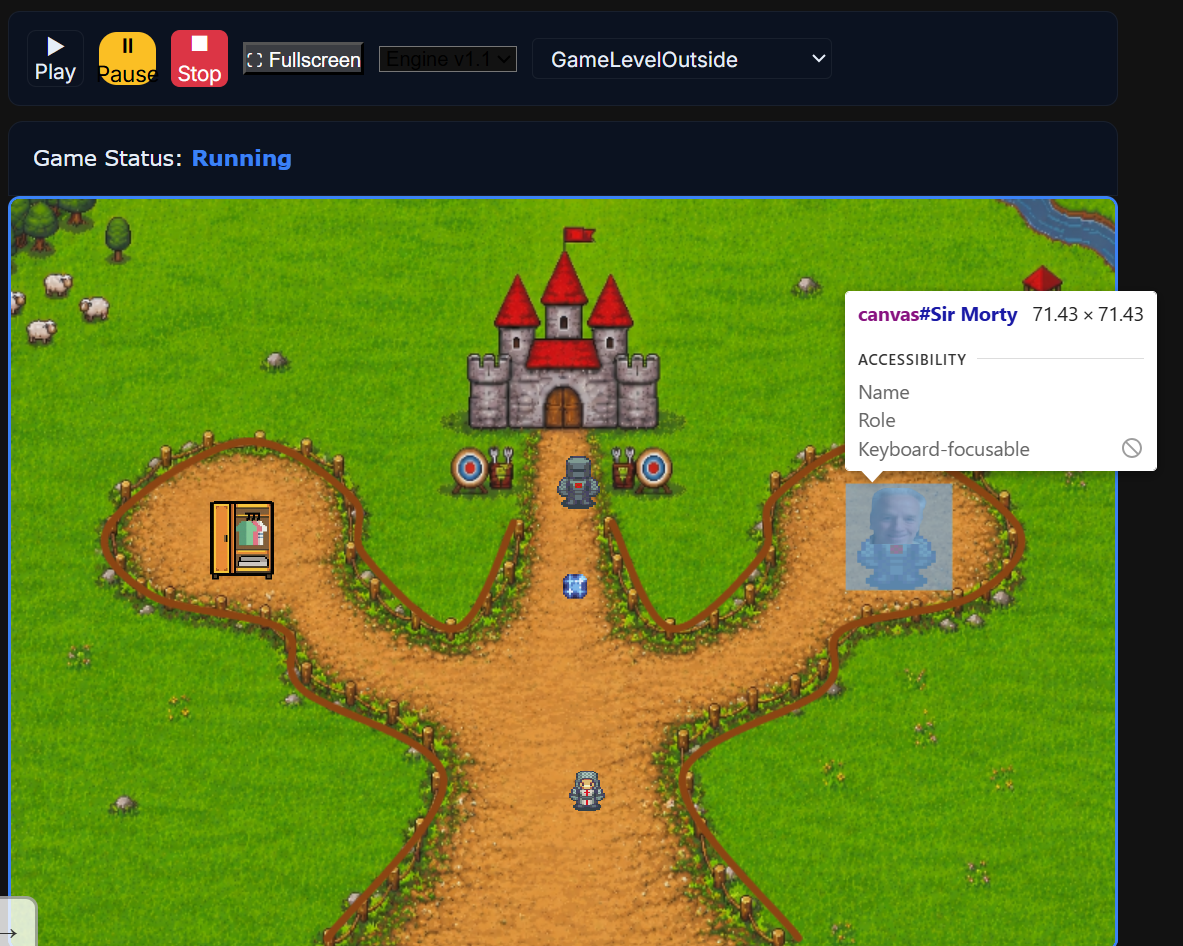
| Element Inspection | Canvas elements are created per object. | |
| Testing & Verification | Gameplay Testing | Levels are playable and transitions are tested live. |
| Integration Testing | Leaderboard calls return data or fall back locally. | |
| API Error Handling | Fetch errors surface user-friendly messages. |
CS111 Evidence & Explanations
Writing Classes
Custom classes extend the engine bases for unique behavior.
class Projectile extends Character {
	// ...
}
Methods & Parameters
Methods take parameters, for example: the spritesheet coin allows you to change its appearance.
// SpriteSheetCoin.js

/**
 * Change the sprite image
 * @param {string} imagePath - Path to the new image
 */
setSprite(imagePath) {
	this.spriteImagePath = imagePath;
	this.isImageLoaded = false;
	this.loadImage();
}
Instantiation & Objects
Game levels instantiate objects with class + data configs.
// GameLevelArchery.js
this.classes = [
  { class: GameEnvBackground, data: image_data_floor },
  { class: FightingPlayer, data: sprite_data_mc },
  { class: Npc, data: sprite_data_villager },
  { class: Barrier, data: barrier_data },
  { class: Enemy, data: target_data },
];
Inheritance (Basic)
The engine uses multi-level class chains.
// DeathBarrier.js

class DeathBarrier extends Barrier {
	// ...
}
// FightingPlayer.js
class FightingPlayer extends Player {
// ...
}// Ghost.js
class Ghost extends Enemy {
// ...
}Method Overriding
Child classes override base behavior.
// FightingPlayer.js

// Update player and the projectiles
update(...args) {
	super.update(...args);  // Do normal player updating

	// Track facing direction based on movement
	if (this.velocity.x > 0) this.currentDirection = 'right';
	else if (this.velocity.x < 0) this.currentDirection = 'left';

	// Update and clean up projectiles
	this.projectiles = this.projectiles.filter(p => !p.revComplete);
	this.projectiles.forEach(p => p.update());
}
Constructor Chaining
Subclasses call super(...) to set base state.
// FightingPlayer.js

/**
 * A version of the Player class with added functionality for shooting projectiles (arrows).
 * @param data - Initial data for the player character.
 * @param gameEnv - The game environment object, providing access to game state and resources.
 *
 * This class extends the basic Player class to allow for SPACE to create arrows
 */
class FightingPlayer extends Player {
    // Construct the class, with a list of stored projectiles
    constructor(data = null, gameEnv = null) {
        super(data, gameEnv);
Iteration
Loops drive collision checks and state updates.
// Scythe.js

for (const player of players) {
	// Calculate center points of both sprites
	const scytheCenterX = this.position.x + this.width / 2;
	const scytheCenterY = this.position.y + this.height / 2;
	const playerCenterX = player.position.x + player.width / 2;
	const playerCenterY = player.position.y + player.height / 2;

	// Calculate distance between center points
	const dx = playerCenterX - scytheCenterX;
	const dy = playerCenterY - scytheCenterY;
	const distance = Math.sqrt(dx * dx + dy * dy);

	// Use relative hit distance based on sprite sizes
	const HIT_DISTANCE = (this.width + player.width) / 3; // One-third of combined width

	if (distance <= HIT_DISTANCE) {
		this.handleCollisionWithPlayer();
		break;
	}
}
Conditionals
State checks and boundary logic use if/else blocks.
// GameLevelOutside.js

// This is where the interactions for starting the game are handled
interact: function () {
	// Clear any existing dialogue first to prevent duplicates
	if (this.dialogueSystem && this.dialogueSystem.isDialogueOpen()) {
		this.dialogueSystem.closeDialogue();
	}

	// Create a new dialogue system if needed
	if (!this.dialogueSystem) {
		this.dialogueSystem = new DialogueSystem();
	}

	// ..lots of code ommitted...
}
Nested Conditions
Gameplay rules combine multiple checks.
// GameLevelArchery.js
if (window.archeryGameStarted) {
  this.position.x += this.velocity.x;
  if (this.position.x <= 0) {
    this.velocity.x = this.speed;
  } else if (this.position.x + this.width >= this.gameEnv.innerWidth) {
    this.velocity.x = -this.speed;
  }
}
Numbers
Positions, speed, and counters are numeric.
// GameLevelArchery.js
this.hitsRemaining = 30;
this.position.x += this.velocity.x;
this.speed += 0.5;
Strings
Strings define ids, greetings, and asset paths.
// GameLevelOutside.js
const image_src_floor = path + "/images/projects/castle-game/castleOutsideV2.png";
const sprite_data_mc = { id: 'Knight', greeting: "Hi, I am a Knight." };
Booleans
Flags control state and logic flow.
// GameLevelArchery.js
window.archeryGameStarted = false;
if (window.archeryVictory) {
  // stop the round
}
Arrays
Arrays hold collections of game objects and configs.
// GameLevelOutside.js

const left_wall = {
	id: 'left-wall-1',
	greeting: "This is a curved barrier, you cannot pass through it!",
	splinePoints: [
		{ x: 318/1110*width, y: 749/760*height },
		{ x: 435/1110*width, y: 587/760*height },
		{ x: 293/1110*width, y: 497/760*height },
		{ x: 273/1110*width, y: 436/760*height },
		{ x: 142/1110*width, y: 402/760*height },
		{ x: 98/1110*width, y: 332/760*height },
		{ x: 233/1110*width, y: 246/760*height },
		{ x: 342/1110*width, y: 302/760*height },
		{ x: 355/1110*width, y: 361/760*height },
		{ x: 447/1110*width, y: 435/760*height },
		{ x: 506/1110*width, y: 327/760*height }
	],
	// Optional: Add visual properties if you want to render the barrier
	visible: true,
	color: '#8B4513',  // Brown color for wooden barrier
	lineWidth: 5        // Line thickness for visual representation
};
// GameLevelOutside.js
this.classes = [
{ class: Player, data: sprite_data_mc },
{ class: StrictNpc, data: sprite_data_darkKnight },
];Objects (JSON)
Sprite and level configs are structured objects.
// GameLevelOutside.js
const sprite_data_mc = {
  id: 'Knight',
  SCALE_FACTOR: 15,
  INIT_POSITION: { x: 0.5 * width, y: 0.75 * height },
  pixels: { height: 432, width: 234 },
};
Mathematical
Math operators handle movement and physics.
// Projectile.js
update() {
	// Move projectile
	this.position.x += this.velocity.x;
	this.position.y += this.velocity.y;
	// ...
}
String Operations
Concatenation and template literals build UI text.
// ArcheryEndScreen.js
const timeLabel = document.createElement('div');
timeLabel.textContent = `Time taken: ${formattedTime}`;
Boolean Expressions
Compound conditions drive collision and movement logic.
// Projectile.js
if (!this.stuck && xDiff <= TARGET_SIZE/2.0 && yDiff <= TARGET_SIZE/2.0) {
	this.stuck = true;
	this.stuckTarget = nearestTarget;
	this.offset.x = this.position.x - nearestTarget.position.x;
	this.offset.y = this.position.y - nearestTarget.position.y;
	this.velocity = {x: 0, y: 0}; // stop moving
	nearestTarget.hitsRemaining -= 1;
	console.log(`Target hit, now has ${nearestTarget.hitsRemaining} health`);

	if (nearestTarget.hitsRemaining <= 0){
		try { showEndScreen(this.gameEnv); } catch (e) { console.warn('Error showing victory screen:', e); }

	}
}
Keyboard Input
Key listeners drive player and NPC interaction.
// FightingPlayer.js
window.addEventListener('keydown', this._attackHandler);
Canvas Rendering
Characters draw sprites on canvas every frame.
// Projectile.js
draw() {
	const ctx = this.ctx;
	this.clearCanvas();

	if (!this.imageLoaded) {
		return;
	}

	// ...
}
GameEnv Configuration
GameEnv creates and sizes the canvas.
// GameEnv.js
create() {
  this.setCanvas();
  this.setTop();
  this.setBottom();
  this.size();
}
API Integration
Leaderboard posts and fetches scores with fetch.
// Leaderboard.js
return fetch(url, { ...fetchOptions, method: 'POST', body: JSON.stringify(requestBody) })
  .then(res => res.json());
Asynchronous I/O
Promise chains handle async network results.
// Leaderboard.js
fetch(`${javaURI}/api/events/SCORE_COUNTER`, fetchOptions)
  .then(res => res.json())
  .then(data => this.displayLeaderboard(data))
  .catch(err => {
    console.error('Error fetching dynamic leaderboard:', err);
  });
JSON Parsing
Local storage and payloads are parsed into objects- for example, in the leaderboard system that we utilize.
// Leaderboard.js
const stored = JSON.parse(localStorage.getItem(storageKey) || '[]');
const transformed = stored.map(e => ({
  id: e.id,
  payload: { user: e.payload.user, score: e.payload.score },
}));
Code Comments
JSDoc blocks document game level classes and methods.
// GameLevelArchery.js

/**
 * GameLevelArchery
 *
 * Defines the configuration for the Archery mini-game level.
 * This class constructs the objects that will exist in the level,
 * including the background, player, NPC, barrier, and moving target.
 *
 * Each object is described with a configuration object that determines
 * sprite properties, positioning, animations, and gameplay behavior.
 */
class GameLevelArchery {

    /**
     * Friendly name of the game level
     * @static
     * @type {string}
     */
    static friendlyName = "Level 2: Archery";


    /**
     * Creates a new Archery level configuration.
     *
     * @param {GameEnvironment} gameEnv - The main game env object
     */
    constructor(gameEnv) {

		// ...rest of code ommitted...
	}
}
Mini-Lesson Documentation
Here are the lessons that I have taught:

Code Highlights
See the sections above for OOP, collisions, and API snippets tied to each objective.
Console Debugging
Logging is used for transitions and diagnostics.
// GameLevelOutside.js

// Clean up current level properly
if (gameControl.currentLevel) {
	// Properly destroy the current level
	console.log("Destroying current level...");
	gameControl.currentLevel.destroy();

	// Force cleanup of any remaining canvases
	const gameContainer = document.getElementById('gameContainer');
	if (gameContainer) {
		const oldCanvases = gameContainer.querySelectorAll('canvas:not(#gameCanvas)');
		oldCanvases.forEach(canvas => {
			console.log("Removing old canvas:", canvas.id);
			canvas.parentNode.removeChild(canvas);
		});
	}
}

console.log("Setting up archery level...");
Hit Box Visualization
A debug helper draws collision bounds in our spline barrier class.
// SplineBarrier.js
draw() {
	// Draw spline curve on the spline barrier's canvas
	if (!this.ctx || !this.canvas) return;
	if (!this.visible) return;

	// Clear canvas
	this.ctx.clearRect(0, 0, this.canvas.width, this.canvas.height);

	// Get curve points
	const curvePoints = SplineBarrier.getCurvePoints(this.splinePoints);
	if (curvePoints.length === 0) return;

	// Draw the spline curve
	this.ctx.strokeStyle = this.barrierColor;
	this.ctx.lineWidth = this.lineWidth;
	this.ctx.lineCap = 'round';
	this.ctx.lineJoin = 'round';

	this.ctx.beginPath();
	this.ctx.moveTo(curvePoints[0].x, curvePoints[0].y);

	for (let i = 1; i < curvePoints.length; i++) {
		this.ctx.lineTo(curvePoints[i].x, curvePoints[i].y);
	}

	this.ctx.stroke();
}
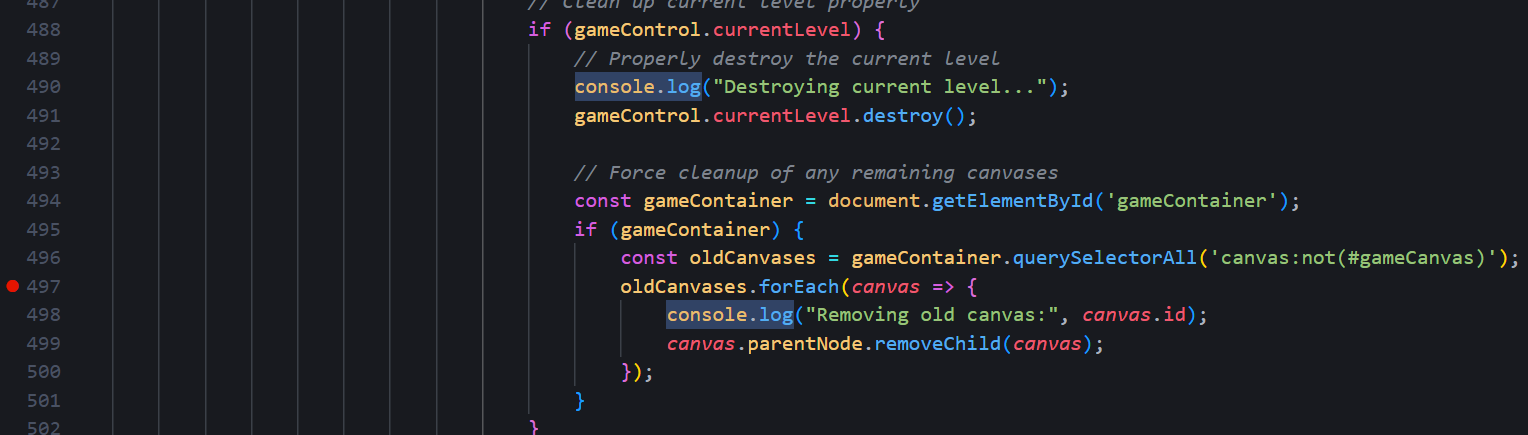
Source-Level Debugging
Breakpoints can be set in update loops and transitions.
// Player.js (though you can do this in any file)
update() {
  super.update();
  // set breakpoint here to inspect velocity, position, collisions
}
Network Debugging
Fetch calls appear in DevTools Network tab.
// Leaderboard.js
fetch(`${javaURI}/api/events/ELEMENTARY_LEADERBOARD`, fetchOptions)
  .then(res => res.json());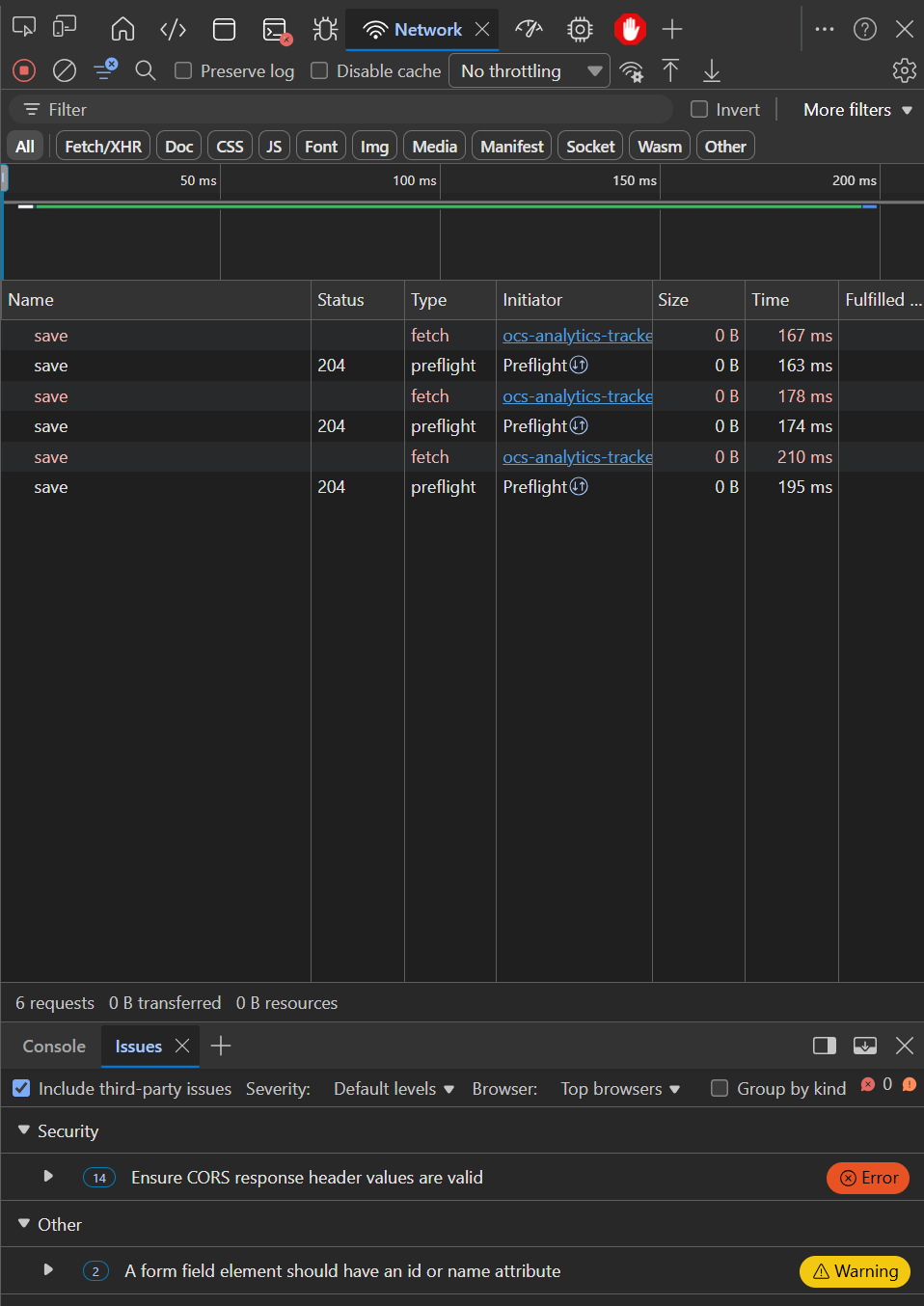
Application Debugging
Local storage is used for player skin and progress flags.
// GameLevelOutside.js
window.localStorage.setItem('castleGame.playerSkin', normalized);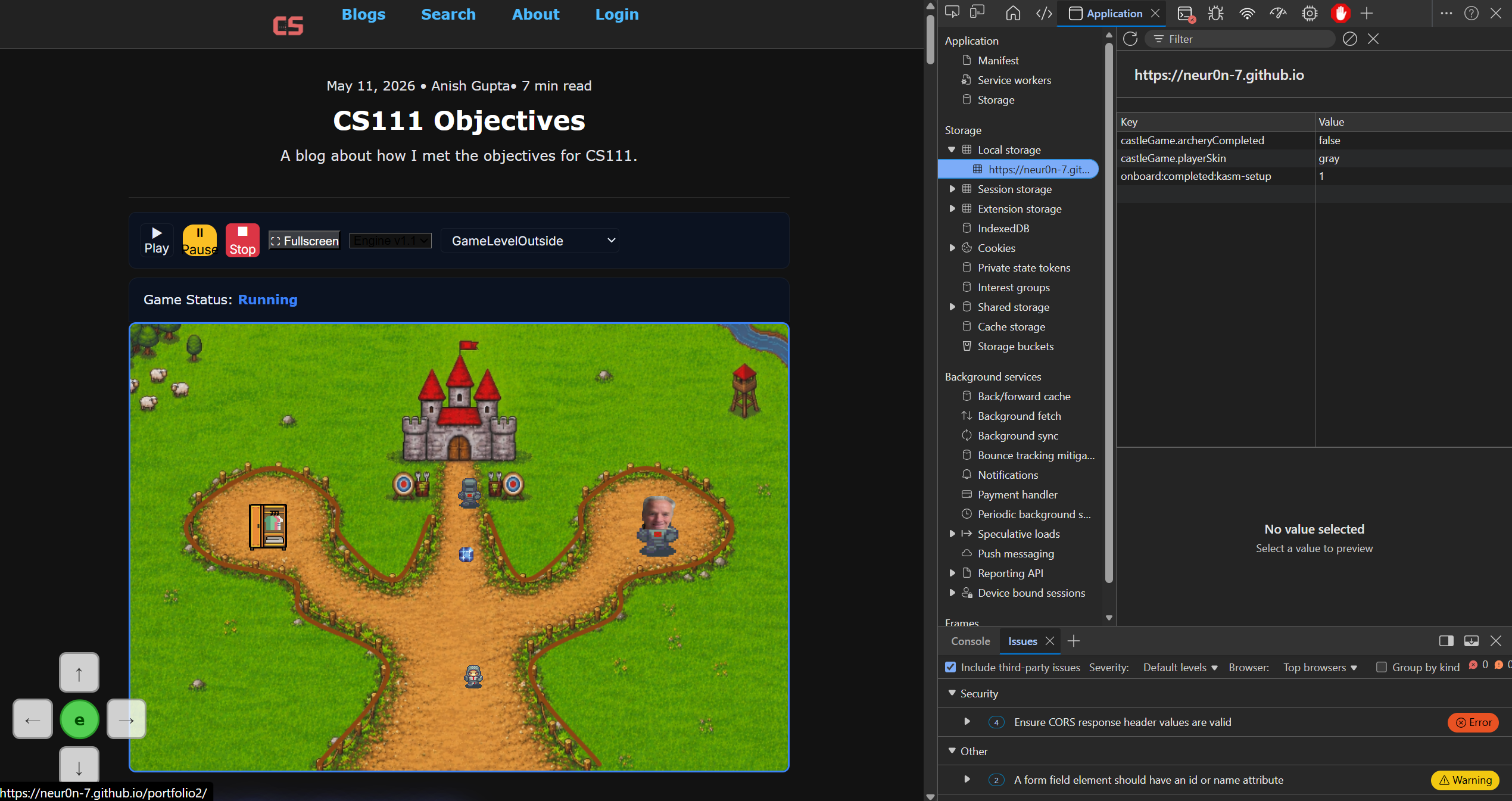
Element Inspection
Each spline barrier creates its own canvas element.
// SplineBarrier.js
// Create a canvas for drawing the spline (not for collision)
this.canvas = document.createElement('canvas');
this.canvas.id = this.id;
this.canvas.width = this.gameEnv.innerWidth;
this.canvas.height = this.gameEnv.innerHeight;
...as well as other game objects (eg characters)
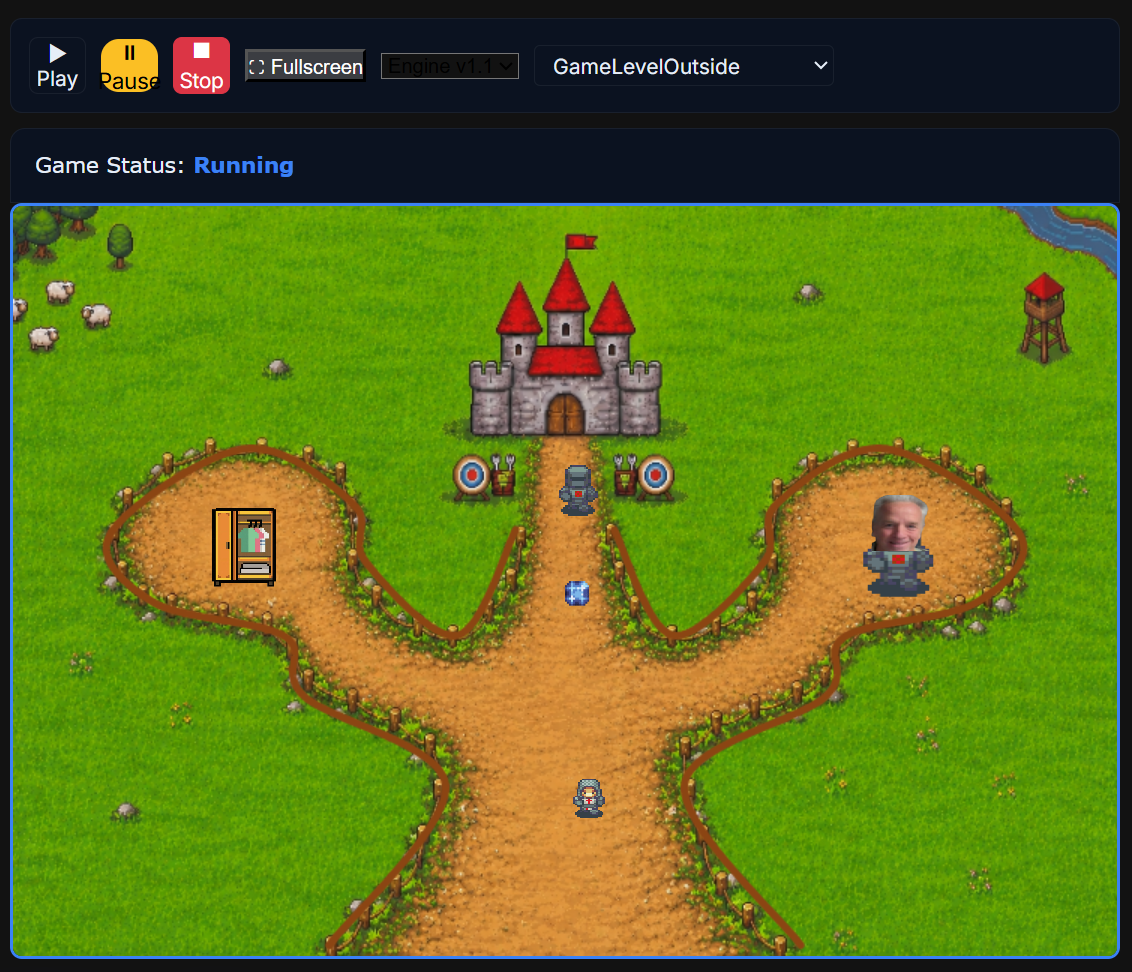
Gameplay Testing
Play through levels to confirm transitions and collisions.
Integration Testing
Leaderboard fetches from backend or falls back to local storage.
// Leaderboard.js
if (!this.hasBackend) {
  const stored = JSON.parse(localStorage.getItem(storageKey) || '[]');
  this.displayLeaderboard(stored);
}
API Error Handling
Errors are caught and reported with user-friendly messages.
// Leaderboard.js
return fetch(url, fetchOptions)
  .then(res => {
    if (!res.ok) throw new Error(`HTTP ${res.status}`);
    return res.json();
  })
  .catch(error => {
    console.error('Error fetching leaderboard:', error);
  });
Code Runner Demos
Code Runner Challenge
Classes & Objects
Code Runner Challenge
Methods & Parameters
Code Runner Challenge
Inheritance & Overriding
Code Runner Challenge
Constructor Chaining
Code Runner Challenge
Iteration
Code Runner Challenge
Conditionals (Nested)
Code Runner Challenge
Objects & JSON Parsing
Code Runner Challenge
Math, Strings, Booleans
Code Runner Challenge
Local Storage